Redundant entry
Institutions had to fill out repeated information manually.
A looping, multi-form onboarding became one guided wizard with clear progress, consistent patterns and fewer pop-ups.
Performance gain from centralising forms, terms and privacy items.
Creating an organisation account was long and inconsistent, with terms that sent users around in loops.
A centralised, guided wizard with a standard heading, status bar, ID verification and consistent pop-ups.
Create New Organization Account · Professional Education Hub
The Professional Education Hub is an online marketplace for digital medical courses, sold to individuals and to large institutions.
An institutional organisation profile is created when a user registers. An individual who belongs to an organisation during checkout receives the best offer, so getting the organisation set up correctly matters commercially.
The existing flow had numerous usability problems and long steps to finish the task. When terms were disputed during organisation creation, users wandered in loops through the same sections.
Institutions re-entered the same information, were unsure what a purchase code would give them, and had no structured way to accept terms before activation.
Institutions had to fill out repeated information manually.
Purchase-code benefits were hard to understand.
There was no structured flow to enforce terms and conditions before activation.
The work followed four steps. I spent the most time in the second: a heuristic evaluation using Jakob Nielsen’s ten usability heuristics, plus WCAG 2.1 checks.
Scroll through the five screens and what each one revealed.


A required field can be bypassed through a link, which confuses users.
User actions are minimal, and the “Company Name” label makes the purpose unclear.
Layout and elements are inconsistent with the previous stage; form screens trigger extra pop-ups.
Titles and descriptions use inconsistent colours.
Terms acceptance behaves unpredictably after logout and login.
Count of issues logged in the audit.
| Measure | Value |
|---|---|
| Aesthetic & minimalist design | 2 |
| Consistency & standards | 2 |
| Help & documentation | 1 |
| Match with the real world | 1 |
Three system-level fixes answered most of the findings, and a re-drawn flow removed the looping.
Tells users what they are doing and where they are, reducing cognitive load.
Shows progress through a multi-step form, plus saving, loading and error states.
Predictable layout avoids reorientation and layout jumps across breakpoints.
Drag the handle to compare the old pop-up sequence with the redesigned one.
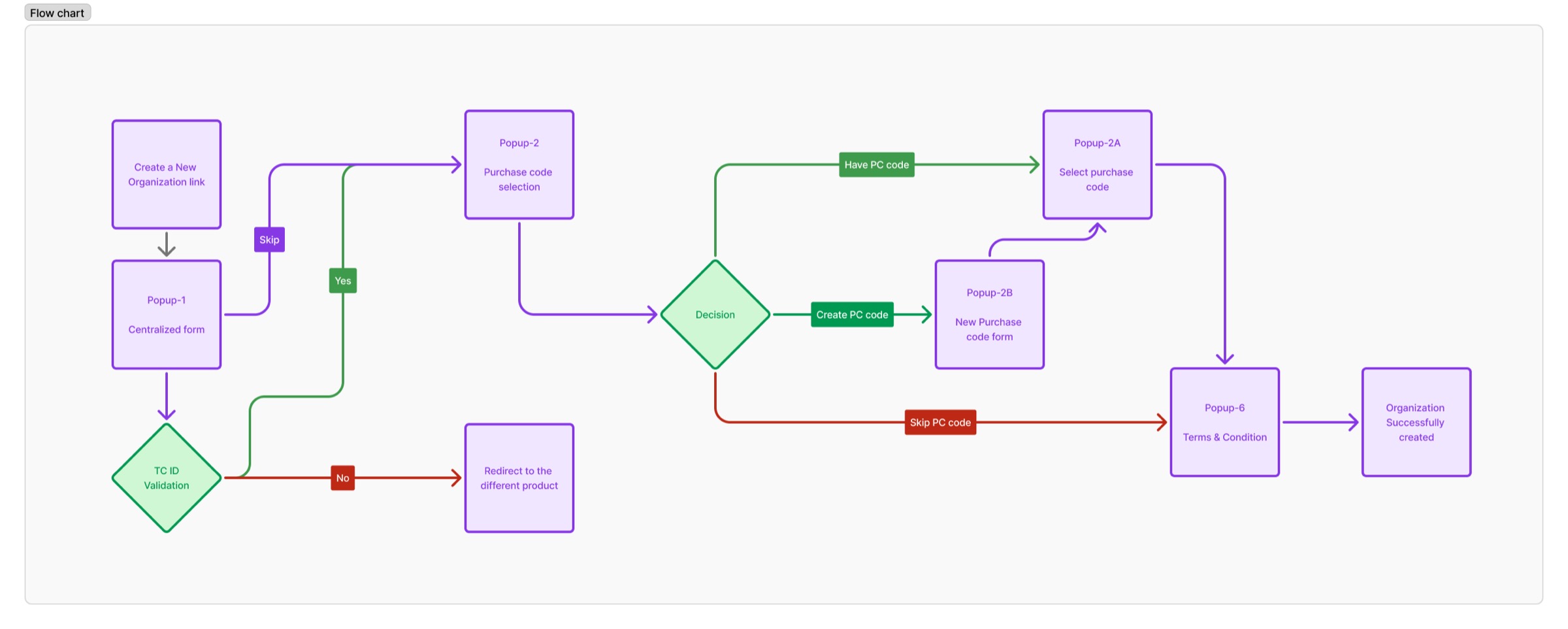
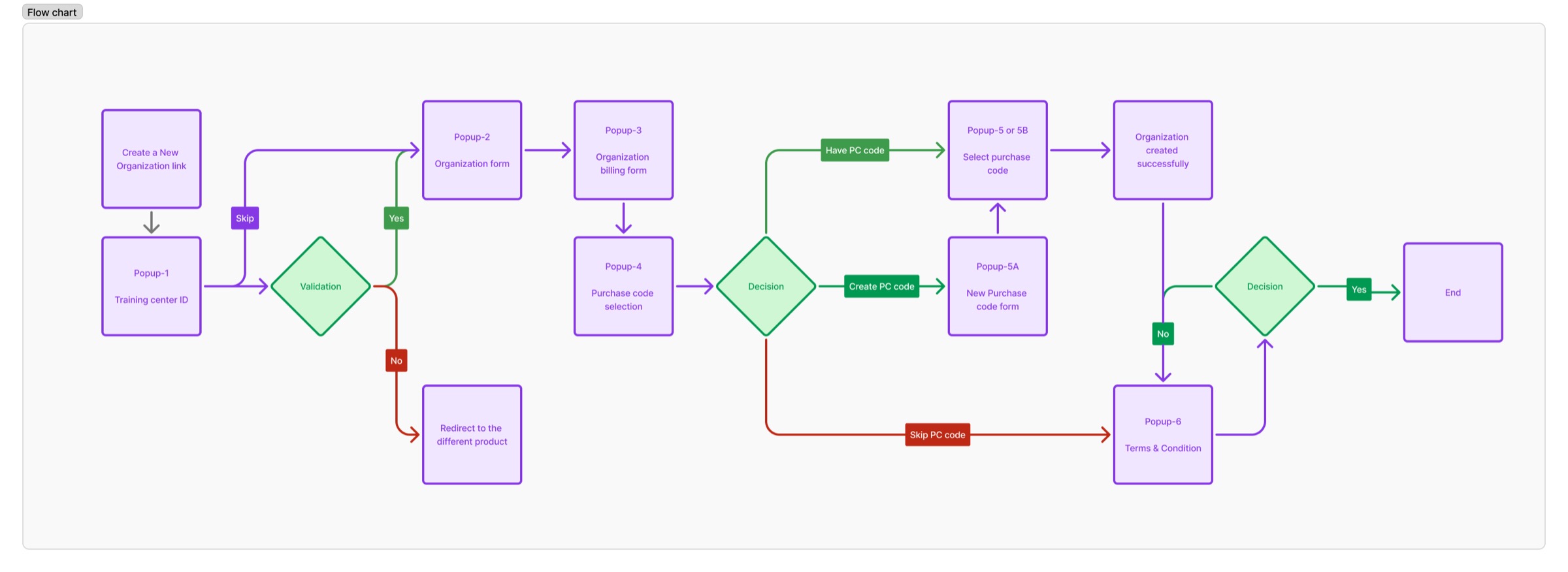
Journey with an existing purchase code.
Forms are centralised into one pop-up with a shared header and wizard progress bar.
Centralising forms, terms and privacy items improved performance and removed repeat effort.
performance gain
usability findings addressed
unified wizard
“These are simple steps that make the flow friendlier and remove the extras. Keeping it simple was the hard part.”
Reflection
Heuristics and accessibility checks.
Crazy 8s and How-Might-We with product and engineering.
High-fidelity flows tied to personas.
Clickable, usability-tested, ready for handoff.
Contact